How do I pay with crypto?
⚠️ Crypto payments are currently unavailable. The information below is kept for reference only.
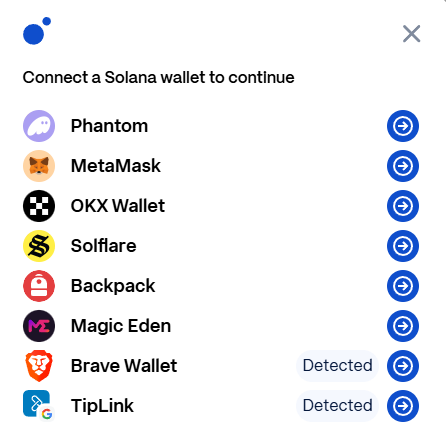
Crypto payments are made in USDC. You need a supported wallet:
- Phantom
- MetaMask
- OKX Wallet
- Solflare
- Backpack
- Magic Eden
- Brave Wallet
- TipLink
⚠️ Only the wallets listed above can be linked. Other wallets (e.g. Exodus) and exchange accounts (Coinbase, Binance) cannot be connected to the payment processor.
If you have funds on an exchange, transfer your USDC to a supported wallet first, then proceed with payment.
Payment Steps
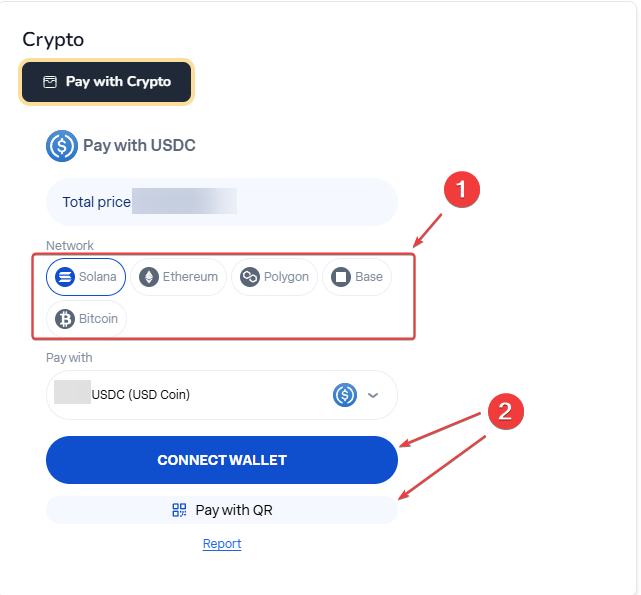
1️⃣ Select "Pay with Crypto" at checkout
2️⃣ Choose your network → We recommend Solana (faster & cheaper)
3️⃣ Choose your payment method:
- Connect Wallet → Link your browser extension wallet
- Pay with QR → Scan the code with your mobile wallet app
4️⃣ Confirm the transaction in your wallet
5️⃣ Wait for confirmation - payment is processed automatically
Payment shows "failed" but my money is gone?
⚠️ Don't panic! Sometimes there's a delay between blockchain confirmation and system update.
What to do:
- Open a support ticket
- Provide your TXID (transaction ID) from your wallet
- Do not spam both public chat and ticket - keep all communication in the ticket only
Our team will verify the payment via your email and TXID.